概述
MySQL-8.0.18主主复制+Keepalived-2.1.5高可用实际生产环境模拟预演,1:1配置分布式双实例MySQL主主复制,组建高可用方案。
MySQL主从规划
主机名 | IP | 备注 |
master | 172.19.19.102 | 主 |
slave | 172.19.19.103 | 主 |
Keepalive | 172.19.19.19 | 高可用 |

这里我下载mysql-8.0.18-1.el8.x86_64.rpm-bundle.tar包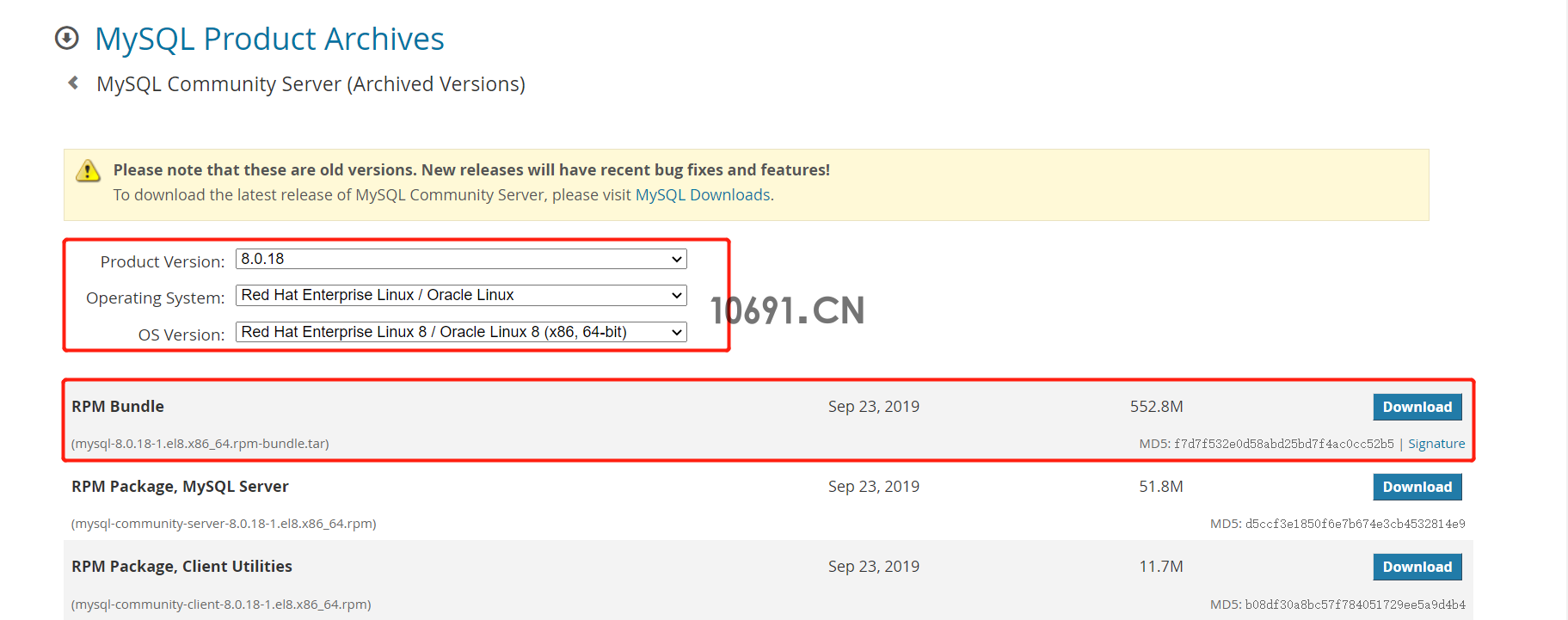 MySQL-8.0.18
[root@localhost opt]# yum install lrzsz -y
[root@localhost opt]# rz
[root@localhost opt]# ll
总用量 566100
-rw-r--r--. 1 root root 579686400 6月 22 09:29 mysql-8.0.18-1.el8.x86_64.rpm-bundle.tar[root@localhost opt]# tar xf mysql-8.0.18-1.el8.x86_64.rpm-bundle.tar
[root@localhost opt]# ll
总用量 1132216
-rw-r--r--. 1 root root 579686400 6月 22 09:29 mysql-8.0.18-1.el8.x86_64.rpm-bundle.tar
-rw-r--r--. 1 7155 31415 12307740 9月 23 2019 mysql-community-client-8.0.18-1.el8.x86_64.rpm
-rw-r--r--. 1 7155 31415 22301616 9月 23 2019 mysql-community-client-debuginfo-8.0.18-1.el8.x86_64.rpm
-rw-r--r--. 1 7155 31415 615256 9月 23 2019 mysql-community-common-8.0.18-1.el8.x86_64.rpm
-rw-r--r--. 1 7155 31415 2893980 9月 23 2019 mysql-community-debuginfo-8.0.18-1.el8.x86_64.rpm
-rw-r--r--. 1 7155 31415 20198496 9月 23 2019 mysql-community-debugsource-8.0.18-1.el8.x86_64.rpm
-rw-r--r--. 1 7155 31415 2090236 9月 23 2019 mysql-community-devel-8.0.18-1.el8.x86_64.rpm
-rw-r--r--. 1 7155 31415 1462400 9月 23 2019 mysql-community-libs-8.0.18-1.el8.x86_64.rpm
-rw-r--r--. 1 7155 31415 2020228 9月 23 2019 mysql-community-libs-debuginfo-8.0.18-1.el8.x86_64.rpm
-rw-r--r--. 1 7155 31415 54321732 9月 23 2019 mysql-community-server-8.0.18-1.el8.x86_64.rpm
-rw-r--r--. 1 7155 31415 20898836 9月 23 2019 mysql-community-server-debug-8.0.18-1.el8.x86_64.rpm
-rw-r--r--. 1 7155 31415 93294068 9月 23 2019 mysql-community-server-debug-debuginfo-8.0.18-1.el8.x86_64.rpm
-rw-r--r--. 1 7155 31415 190301696 9月 23 2019 mysql-community-server-debuginfo-8.0.18-1.el8.x86_64.rpm
-rw-r--r--. 1 7155 31415 142439684 9月 23 2019 mysql-community-test-8.0.18-1.el8.x86_64.rpm
-rw-r--r--. 1 7155 31415 14521988 9月 23 2019 mysql-community-test-debuginfo-8.0.18-1.el8.x86_64.rpm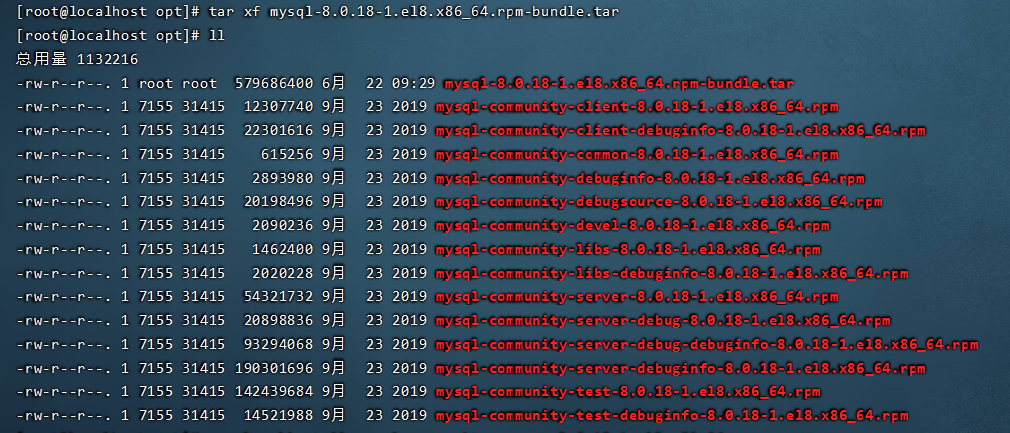 MySQL-8.0.18 RPM包目录
务必注意RPM包依赖顺序依次为:mysql-community-common >> mysql-community-libs >> mysql-community-client >> mysql-community-server,其他RPM包非必须安装,自选。
[root@localhost opt]# rpm -ivh mysql-community-common-8.0.18-1.el8.x86_64.rpm --nodeps --force
警告:mysql-community-common-8.0.18-1.el8.x86_64.rpm: 头V3 DSA/SHA1 Signature, 密钥 ID 5072e1f5: NOKEY
Verifying...                          ################################# [100%]
准备中...                          ################################# [100%]
正在升级/安装...
   1:mysql-community-common-8.0.18-1.e################################# [100%]
[root@localhost opt]# rpm -ivh mysql-community-libs-8.0.18-1.el8.x86_64.rpm --nodeps --force;
警告:mysql-community-libs-8.0.18-1.el8.x86_64.rpm: 头V3 DSA/SHA1 Signature, 密钥 ID 5072e1f5: NOKEY
Verifying...                          ################################# [100%]
准备中...                          ################################# [100%]
正在升级/安装...
   1:mysql-community-libs-8.0.18-1.el8################################# [100%]
[root@localhost opt]# rpm -ivh mysql-community-client-8.0.18-1.el8.x86_64.rpm --nodeps --force
警告:mysql-community-client-8.0.18-1.el8.x86_64.rpm: 头V3 DSA/SHA1 Signature, 密钥 ID 5072e1f5: NOKEY
Verifying...                          ################################# [100%]
准备中...                          ################################# [100%]
正在升级/安装...
   1:mysql-community-client-8.0.18-1.e################################# [100%]
[root@localhost opt]# rpm -ivh mysql-community-server-8.0.18-1.el8.x86_64.rpm --nodeps --force
警告:mysql-community-server-8.0.18-1.el8.x86_64.rpm: 头V3 DSA/SHA1 Signature, 密钥 ID 5072e1f5: NOKEY
Verifying...                          ################################# [100%]
准备中...                          ################################# [100%]
正在升级/安装...
   1:mysql-community-server-8.0.18-1.e################################# [100%]
[/usr/lib/tmpfiles.d/mysql.conf:23] Line references path below legacy directory /var/run/, updating /var/run/mysqld → /run/mysqld; please update the tmpfiles.d/ drop-in file accordingly.
[/usr/lib/tmpfiles.d/subscription-manager.conf:1] Line references path below legacy directory /var/run/, updating /var/run/rhsm → /run/rhsm; please update the tmpfiles.d/ drop-in file accordingly.[root@localhost opt]# mkdir -p /usr/local/mysql/data
[root@localhost opt]# mkdir -p /usr/local/mysql/logs[root@localhost opt]# mysqld --initialize --user=mysql --basedir=/usr/local/mysql --datadir=/usr/local/mysql/data[root@localhost opt]# cat /var/log/mysqld.log |grep pass MySQL初始密码
[root@localhost opt]# systemctl start mysqld
[root@localhost opt]# systemctl status mysqld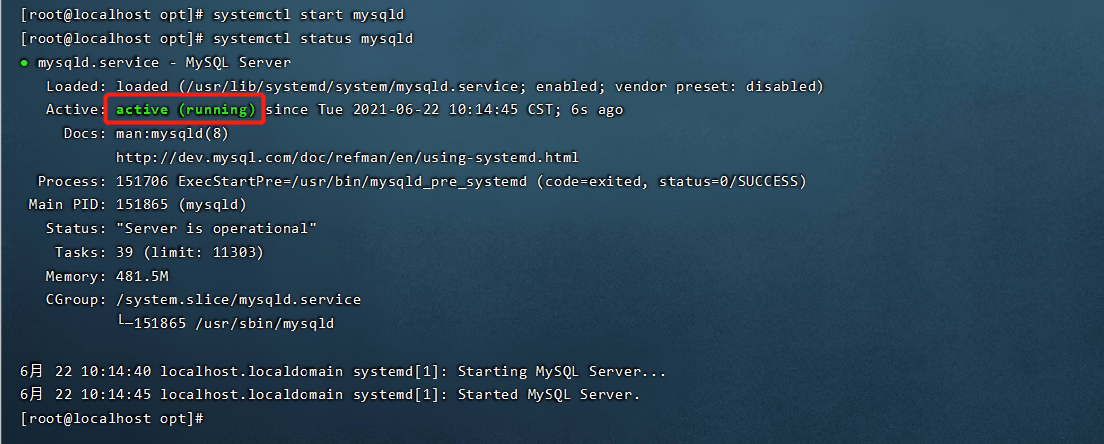 MySQL启动状态校验
[root@localhost opt]# mysql -uroot -p
Enter password: e!VD<uRA6y!&       //输入初始密码回车

Welcome to the MySQL monitor.  Commands end with ; or \g.
Your MySQL connection id is 10
Server version: 8.0.18

Copyright (c) 2000, 2019, Oracle and/or its affiliates. All rights reserved.

Oracle is a registered trademark of Oracle Corporation and/or its
affiliates. Other names may be trademarks of their respective
owners.

Type 'help;' or '\h' for help. Type '\c' to clear the current input statement.

mysql>
mysql> alter user root@localhost identified by '10691.Cn';mysql> alter user root@localhost identified by '10691.Cn';
mysql> quit
Bye解决办法
[root@localhost opt]# rpm -ivh mysql-community-server-8.0.18-1.el8.x86_64.rpm --nodeps --force[root@localhost ~]# vim /etc/my.cnfmaster节点
log-bin=mysql-bin
binlog_format=ROW
log_slave_updates=1
expire_logs_days=7
max_binlog_size=100M

server-id=2

default-storage-engine=INNODB
max_connections=200
slave节点
log-bin=mysql-bin
binlog_format=ROW
log_slave_updates=1
expire_logs_days=7
max_binlog_size=100M

server-id=3

default-storage-engine=INNODB
max_connections=200
重启MySQL
[root@localhost ~]# systemctl restart mysqld
MYSQL状态
master节点
[root@master ~]# mysql -uroot -p
Enter password: 10691.Cn

mysql> create user 'user'@'172.19.19.103' identified WITH mysql_native_password by '10691.Cn';
Query OK, 0 rows affected (0.02 sec)

mysql> GRANT REPLICATION SLAVE ON *.* to 'user'@'172.19.19.103' ;
Query OK, 0 rows affected (0.00 sec)

mysql> grant all privileges on *.* to 'user'@'172.19.19.103' with grant option;
Query OK, 0 rows affected (0.02 sec)

mysql> flush privileges;
Query OK, 0 rows affected (0.00 sec)
查看MySQL节点状态信息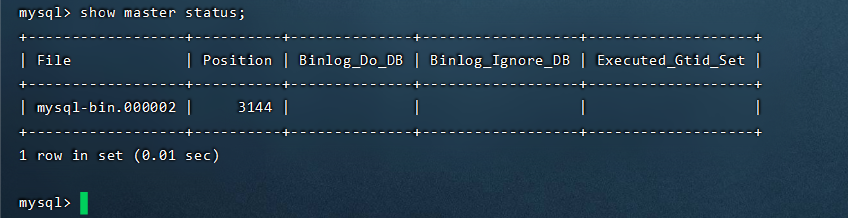 MySQL master状态
slave节点
[root@slave ~]# mysql -uroot -p
Enter password: 10691.Cn

mysql> create user 'user'@'172.19.19.102' identified WITH mysql_native_password by '10691.Cn';
Query OK, 0 rows affected (0.02 sec)

mysql> GRANT REPLICATION SLAVE ON *.* to 'user'@'172.19.19.102' ;
Query OK, 0 rows affected (0.00 sec)

mysql> grant all privileges on *.* to 'user'@'172.19.19.102' with grant option;
Query OK, 0 rows affected (0.02 sec)

mysql> flush privileges;
Query OK, 0 rows affected (0.00 sec)
查看MySQL节点状态信息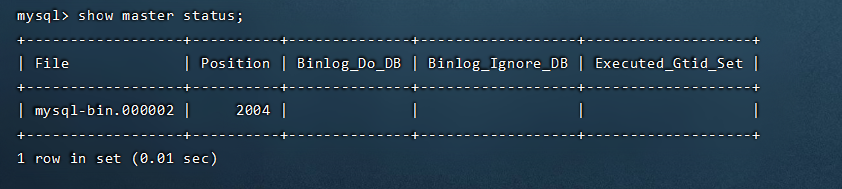 MySQL slave状态信息
master节点
mysql> change master to master_host='172.19.19.103',master_user='user',master_password='10691.Cn',master_log_file='mysql-bin.000001',master_log_pos=3005549;
mysql> start slave;
验证master节点
mysql> show slave status\G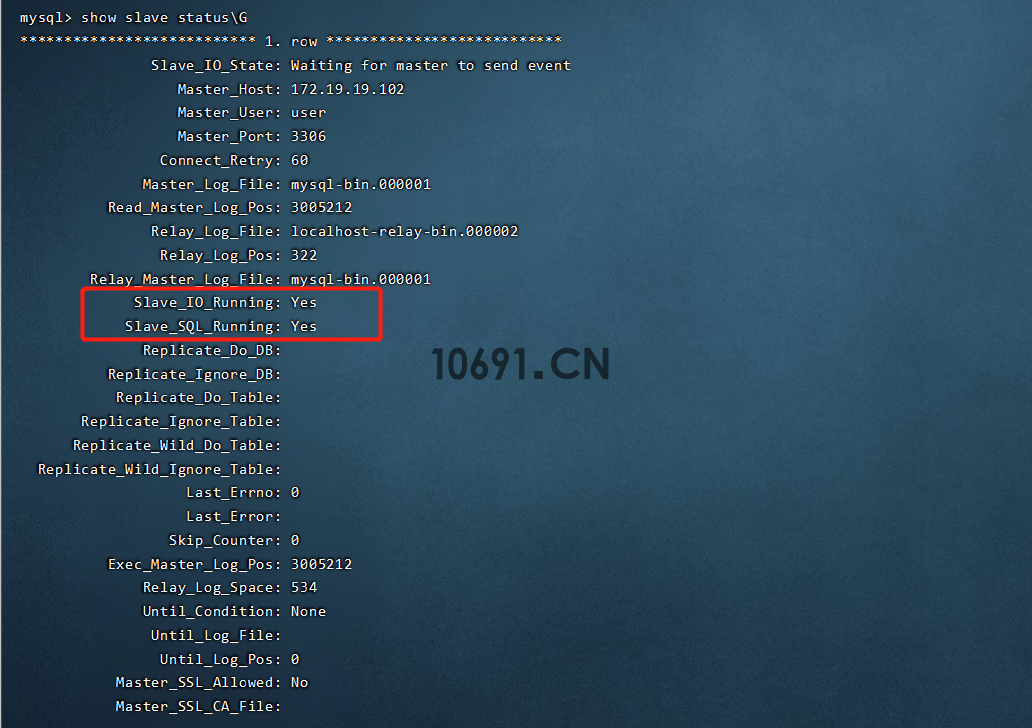
MySQL同步守护进程OK
slave节点
mysql> change master to master_host='172.19.19.102',master_user='user',master_password='10691.Cn',master_log_file='mysql-bin.000001',master_log_pos=3005212;
mysql> start slave;
mysql> show slave status\G;
验证slave节点
mysql> show slave status\G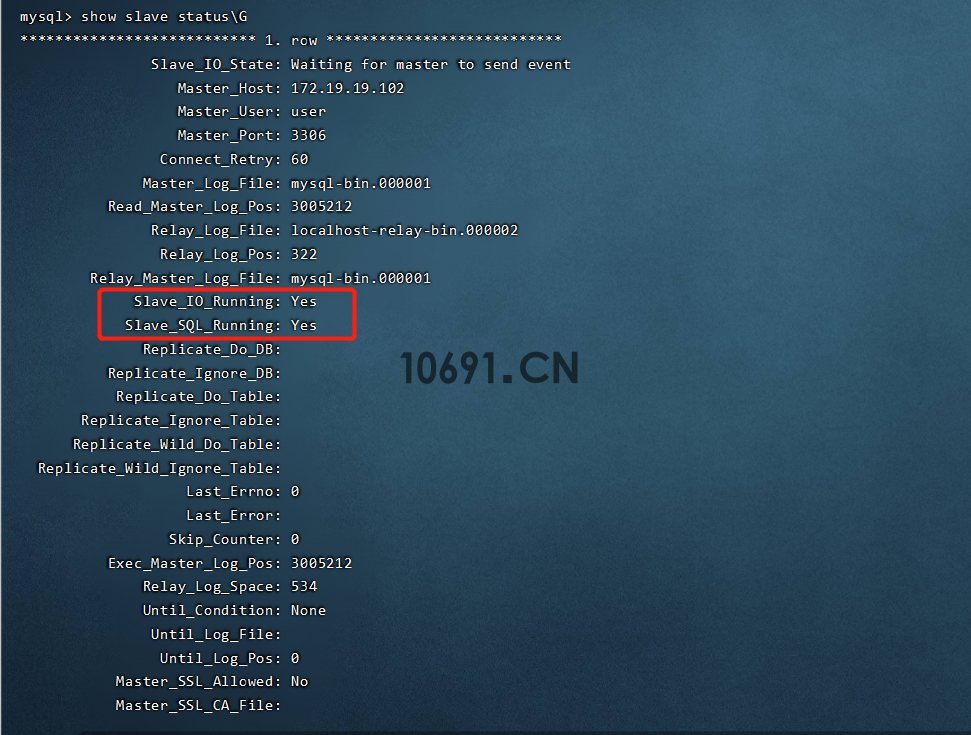
MySQL同步守护进程OK
[root@localhost ~]# yum install keepalived -y
上次元数据过期检查:1:16:22 前,执行于 2021年06月22日 星期二 15时19分28秒。
依赖关系解决。
======================================================================================================================================================================================
 软件包                                        架构                             版本                                                        仓库                                 大小
======================================================================================================================================================================================
安装:
 keepalived                                    x86_64                           2.1.5-6.el8                                                 AppStream                           537 k
安装依赖关系:
 lm_sensors-libs                               x86_64                           3.4.0-22.20180522git70f7e08.el8                             BaseOS                               59 k
 net-snmp-agent-libs                           x86_64                           1:5.8-20.el8                                                AppStream                           748 k
 net-snmp-libs                                 x86_64                           1:5.8-20.el8                                                BaseOS                              824 k

事务概要
======================================================================================================================================================================================
安装  4 软件包

总下载:2.1 M
安装大小:6.9 M
下载软件包:
(1/4): lm_sensors-libs-3.4.0-22.20180522git70f7e08.el8.x86_64.rpm                                                                                     201 kB/s |  59 kB     00:00
(2/4): keepalived-2.1.5-6.el8.x86_64.rpm                                                                                                              846 kB/s | 537 kB     00:00
(3/4): net-snmp-agent-libs-5.8-20.el8.x86_64.rpm                                                                                                      922 kB/s | 748 kB     00:00
(4/4): net-snmp-libs-5.8-20.el8.x86_64.rpm                                                                                                            894 kB/s | 824 kB     00:00
--------------------------------------------------------------------------------------------------------------------------------------------------------------------------------------
总计                                                                                                                                                  891 kB/s | 2.1 MB     00:02
运行事务检查
事务检查成功。
运行事务测试
事务测试成功。
运行事务
  准备中  :                                                                                                                                                                       1/1
  安装    : net-snmp-libs-1:5.8-20.el8.x86_64                                                                                                                                     1/4
  安装    : lm_sensors-libs-3.4.0-22.20180522git70f7e08.el8.x86_64                                                                                                                2/4
  运行脚本: lm_sensors-libs-3.4.0-22.20180522git70f7e08.el8.x86_64                                                                                                                2/4
  安装    : net-snmp-agent-libs-1:5.8-20.el8.x86_64                                                                                                                               3/4
  安装    : keepalived-2.1.5-6.el8.x86_64                                                                                                                                         4/4
  运行脚本: keepalived-2.1.5-6.el8.x86_64                                                                                                                                         4/4
  验证    : keepalived-2.1.5-6.el8.x86_64                                                                                                                                         1/4
  验证    : net-snmp-agent-libs-1:5.8-20.el8.x86_64                                                                                                                               2/4
  验证    : lm_sensors-libs-3.4.0-22.20180522git70f7e08.el8.x86_64                                                                                                                3/4
  验证    : net-snmp-libs-1:5.8-20.el8.x86_64                                                                                                                                     4/4

已安装:
  keepalived-2.1.5-6.el8.x86_64      lm_sensors-libs-3.4.0-22.20180522git70f7e08.el8.x86_64      net-snmp-agent-libs-1:5.8-20.el8.x86_64      net-snmp-libs-1:5.8-20.el8.x86_64

完毕!
2、配置keepalived
master节点
! Configuration File for keepalived

global_defs {
   router_id DB-HA
}

vrrp_script chk_mysql_port {
    script "/scripts/check_mysql.sh"
    interval 2
    weight -5
    fall 2
    rise 1
}

vrrp_instance VI_1 {
    state MASTER
    interface eth0
    virtual_router_id 110
    mcast_src_ip 172.19.19.102
    priority 100
    advert_int 1
    authentication {
        auth_type PASS
        auth_pass 1111
    }
    virtual_ipaddress {
        172.19.19.19
    }
    track_script {
        chk_mysql_port
}
}
slave节点
! Configuration File for keepalived

global_defs {
   router_id DB-HA
}

vrrp_script chk_mysql_port {
    script "/scripts/check_mysql.sh"
    interval 2
    weight -5
    fall 2
    rise 1
}

vrrp_instance VI_1 {
    state BACKUP
    interface eth0
    virtual_router_id 110
    mcast_src_ip 172.19.19.103
    priority 90
    advert_int 1
    authentication {
        auth_type PASS
        auth_pass 1111
    }
    virtual_ipaddress {
        172.19.19.19
    }
    track_script {
        chk_mysql_port
}
}[root@localhost ~]# mkdir -p /etc/keepalived/scripts
[root@localhost ~]# vim /etc/keepalived/scripts/check_mysql.sh#!/bin/bash
counter=$(netstat -lntp|grep 3306|wc -l)
if [ "${counter}" -eq 0 ]; then
systemctl stop keepalived
fi授权脚本可执行权限
[root@localhost ~]# chmod +x /etc/keepalived/scripts/check_mysql.sh[root@localhost ~]# systemctl start keepalived[root@localhost ~]# ip a
1: lo: <LOOPBACK,UP,LOWER_UP> mtu 65536 qdisc noqueue state UNKNOWN qlen 1
link/loopback 00:00:00:00:00:00 brd 00:00:00:00:00:00
inet 127.0.0.1/8 scope host lo
valid_lft forever preferred_lft forever
inet6 ::1/128 scope host
valid_lft forever preferred_lft forever
2: eth0: <BROADCAST,MULTICAST,UP,LOWER_UP> mtu 1500 qdisc mq state UP qlen 1000
link/ether bc:95:e1:s9:2G:3g brd ff:ff:ff:ff:ff:ff
inet 172.19.19.102/21 brd 192.168.10.255 scope global eth0
valid_lft forever preferred_lft forever
inet 172.19.19.19/32 scope global eth0
valid_lft forever preferred_lft forever
inet6 fe80::9714:an6b:43g3:c3i5/64 scope link
valid_lft forever preferred_lft forever至此、基于keepalived搭建MySQL主主同步环境完毕!欢迎留言讨论提升!

提示:如遇链接失效,请在评论区留言反馈